
1. Introduction
Hello! I’m a Software Development Engineer in Test (SDET) at Money Forward, working on building automation and integrating test frameworks across multiple HR products.
Over time, our testing evolved from simple unit checks to complex end-to-end validations, but something important was missing in between.
We had strong unit tests and well-defined manual E2E tests, but lacked API tests for the layer where most business logic lives. This gap meant:
- Feedback arrived late, only after full E2E runs
- Manual verification took significant time
- Maintaining quality across multiple backend products became increasingly difficult
We realized that the API layer, where most business logic lives, deserved the same level of automation and visibility.
To address this, we designed a scalable API automation framework built with TypeScript, Playwright, and Cucumber.js, focusing on two goals:
- Make API automation developer-friendly and easy to extend
- Enable shared ownership among QA, SDET, and backend teams
In this blog, I’ll walk through how we designed the framework, the
architectural decisions behind it, and the lessons we learned while scaling API automation across multiple products.
2. Problem
When introducing automation across six products, we first faced a fundamental design choice: how to structure and scale test repositories effectively.
We evaluated four different approaches:
Centralized QA Repository
All automation code stored in a single repo.
- Pros: easy to track in one place.
- Cons: risk of complexity, tight coupling, maintenance overhead as product count grows, and version-control challenges (tests not matching feature branches).
Separate QA Repositories (per product)
Each product has its own dedicated test repo.
- Pros: clear ownership per team.
- Cons: duplication of setup and reusable components, inconsistent frameworks, higher maintenance burden.
Shared Framework + Separate Test Repositories
Common utilities live in a framework repo, and each product consumes them through its own dedicated test repo.
- Pros: promotes reuse and consistency across teams.
- Cons: Developers must manage an additional repo, adding friction and slowing adoption.
Embed API Tests Inside Each Product Backend Repo (Our Choice)
API tests are embedded directly inside each product’s backend repository under an api_test/ folder, while common utilities and reusable components are maintained in a separate shared framework package that each product consumes.
- Pros: tests live next to the product code, easy for Developers to contribute directly, and CI integration works naturally with product PRs.
- Cons: requires careful separation of common vs product-specific logic.
Why this approach? See how we addressed these constraints in the next section.
We also faced the following constraints:
- QA resources were limited and could not scale to cover six products independently.
- Developers needed to contribute to test creation, but building automation from scratch would be too time-consuming.
- Architectural diversity made things harder: some products expose REST APIs, while others rely on GraphQL.
This meant that without a unifying strategy, test automation would either become fragmented or unsustainable.
3. Solution
To make API automation scalable across products, we designed a two-layer architecture that separates shared utilities from product-specific test suites.
This design allows Developers to contribute tests easily while keeping consistency across all teams.
Layer 1: Shared Framework
The shared framework acts as the foundation for all API test automation.
It provides:
- Reusable utilities for authentication, assertions, logging, and database helpers
- Pre-built Cucumber step definitions for common REST and
GraphQL operations - Configurable environment setup for both local and CI runs
Each product simply installs the shared framework as a dependency and reuses its core components.
// Example usage from a product test suite
import { setBaseUrl, authenticate } from "framework";
import "framework/steps/default.steps";
Layer 2: Product Test Suite
Each product backend repository includes a lightweight api_test/ folder.
It contains only product-specific test logic, Gherkin feature files, and data definitions.
project-backend/
│── src/
│── api_test/
│   │── features/     # Gherkin feature files
│   │── steps/        # Product-specific step definitions
│   │── graphql/      # Queries, mutations, types
│   │── support/      # Helpers, hooks, factories
│   └── reports/      # Test execution reports
This structure allows Developers to:
- Write Gherkin scenarios next to the source code they implement
- Run tests locally with the same commands used in CI
- Receive immediate feedback on pull requests when API tests fail
Why This Approach Works
This setup strikes a practical balance between reuse and independence:
- The framework layer ensures consistency and standardization across teams.
- The product layer keeps test ownership local and development-friendly.
It avoids both extremes, a heavy centralized repository and fragmented per-product setups, resulting in a model that scales naturally with team growth.
Visual Overview: Architecture
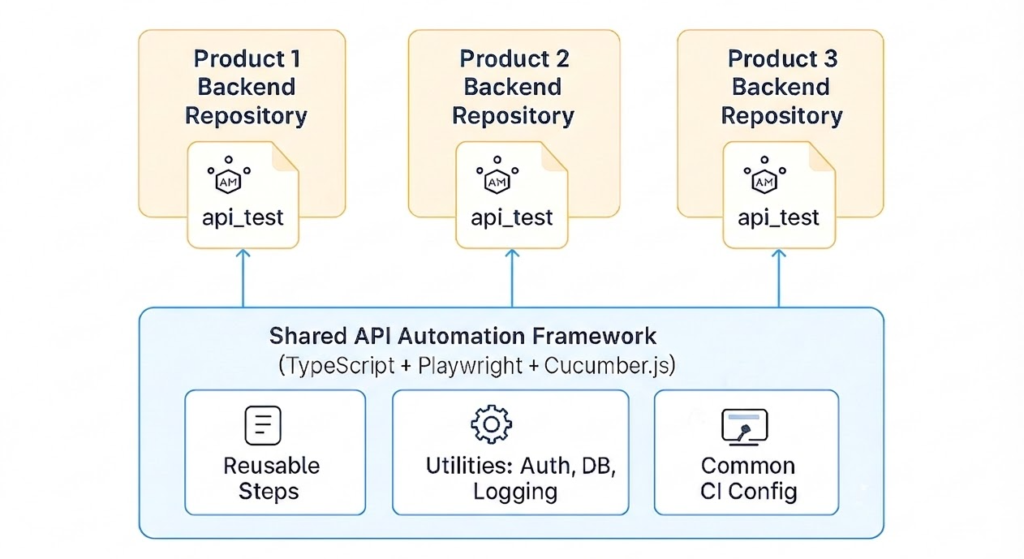
Shared Framework powering embedded API tests across products
4. Example Code Blocks
Once the shared framework is available, Developers can immediately start writing API tests using its built-in step definitions and utilities.
All they need to focus on are product-specific scenarios, not the boilerplate.
Gherkin Feature
Feature: User Management

  Scenario: Create a new user
    Given I have a valid authentication token
    When I send a POST request to "/user" with the following data:
      | name        | department |
      | Tanaka Taro | General    |
    Then the response status should be 201
    And the response body should contain "Tanaka Taro"

  Scenario: Query user by ID
    Given I have a valid authentication token
    When I send a GraphQL query "getUser" with variables:
      | id  |
      | 123 |
    Then the response status should be 200
    And the response should contain field "user.name"
This simple scenario verifies the “user” API. Developers only describe behavior, the framework handles the request logic and validation behind the scenes.
Step Definitions
Most steps are already part of the shared framework. Each product can import them directly and extend only when unique logic is needed.
// api_test/steps/employee.steps.ts
import "framework/steps/http.steps"; //  shared request steps (GET, POST, etc.)
import "framework/steps/validation.steps"; //  shared validation utilities
When a product needs to extend behavior, for example, to handle specific POST requests, local steps can be added easily:
import { When, DataTable } from "@cucumber/cucumber";
import { apiClient } from "framework/utils/apiClient";

When('I send a POST request to {string} with the following data:', async function (endpoint: string, table: DataTable) {
  // Uses shared apiClient to send POST request
  // Store the response for later assertions
});
Shared Utility Example (from Framework)
// framework/utils/apiClient.ts
import axios from "axios";

export const apiClient = {
  async request(method: string, endpoint: string, data?: any, token?: string) {
    const headers = token ? { Authorization: `Bearer ${token}` } : {};
    const response = await axios({ method, url: endpoint, data, headers });
    return response;
  },
};
Shared utilities like apiClient remove duplicate setup and ensure consistent request handling across all products.
Visual Overview: Test Execution Flow
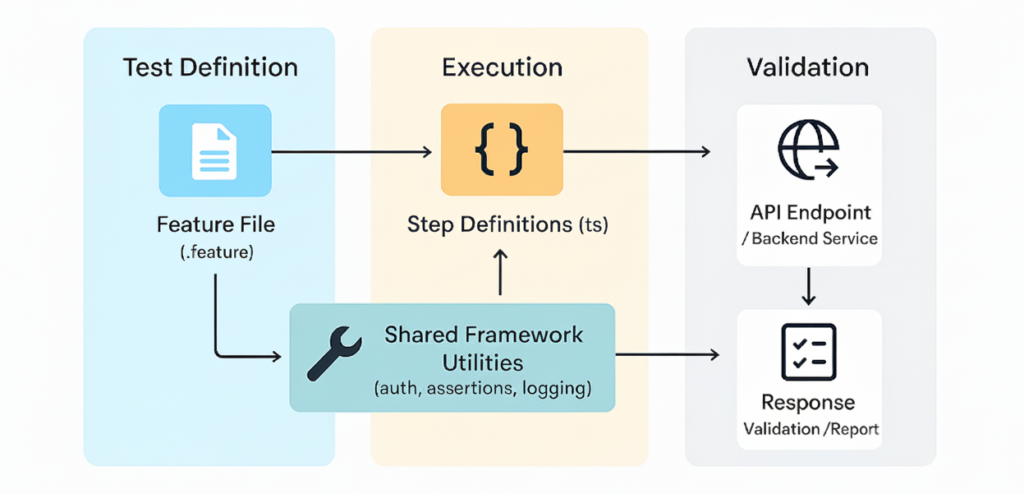
End-to-End Flow of API Test Execution
5. CI/CD Integration
To ensure every code change is automatically verified, the API test suites are integrated directly into each product’s CI/CD pipeline.
This gives Developers immediate feedback on pull requests and ensures QA teams can rely on consistent quality gates across all repositories.
How It Works
- The CI job starts the product’s backend and installs all the dependencies.
- The test runner executes all Gherkin scenarios inside the
api_test/folder. - Reports are generated automatically and attached to the pipeline output.
- If any test fails, the pull request cannot be merged — ensuring API stability at every commit.
Example CI Configuration (CircleCI)
run_api_tests:
  docker:
    - image: node:20
  steps:
    - checkout
    - run:
        name: Install dependencies
        command: npm ci
    - run:
        name: Run API tests
        command: npm run test:api
  artifacts:
    paths:
      - api_test/reports/
This setup made API quality checks a natural extension of our CI process and not a manual afterthought.
Visual Overview: CI/CD Pipeline
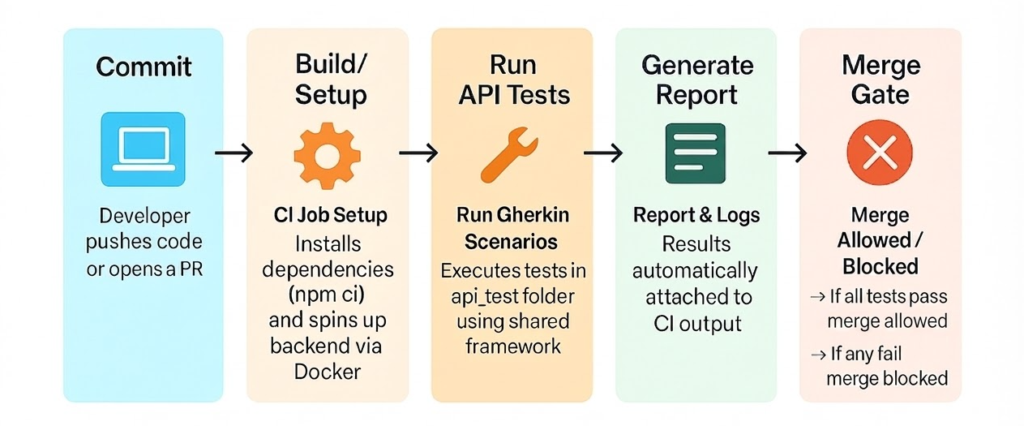
API Test Execution in CI/CD Pipeline – Automated tests run on every commit, blocking merges on failure
6. Collaboration (QA / Dev / SDET)
Building the framework was only half the journey, the real success came from how different roles started collaborating through it.
Our goal was to make API automation a shared responsibility, not a task owned by a single team.
QA Engineers
- Review Gherkin feature files to track coverage.
- Ensure that all key business scenarios are represented.
Developers
- Add new Gherkin scenarios under each product’s
api_test/features/directory. - Contribute step definitions when needed, with support from SDETs.
SDET Engineers
- Integrate the shared framework into product repositories and seed initial test cases.
- Review developer contributions and extend the framework with reusable steps and utilities.
The outcome: QA ensures coverage, Developers contribute scenarios, and SDETs maintain the backbone. This shared ownership model bridged traditional gaps between QA and development, making API testing a natural part of everyday development.
Visual Overview: Team Collaboration
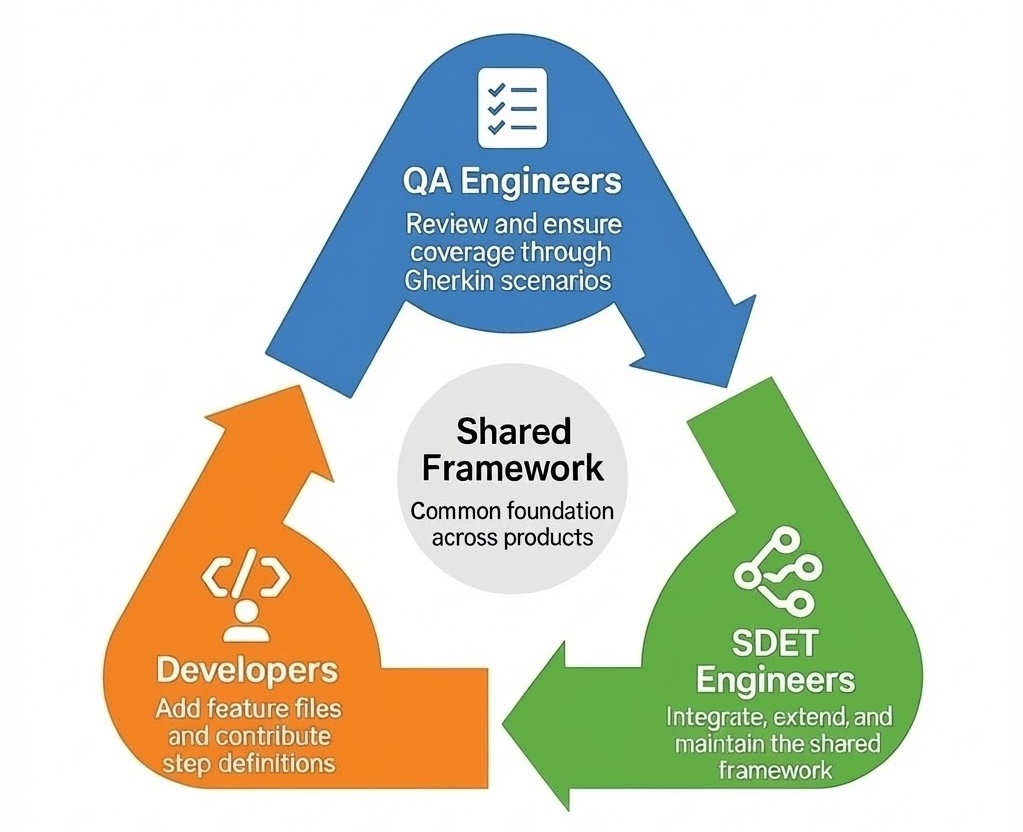
QA, Developers, and SDETs collaborate continuously through a shared framework – ensuring quality is built in
7. Benefits
Adopting our shared API automation framework has transformed how QA, SDET, and development teams collaborate. The result is not just faster test execution, but a consistent and scalable approach to quality across all backend products.
Faster Onboarding for Developers
- Tests live inside the same product repository Developers already work in, eliminating the need for a separate automation repo or tool.
- Clear examples and prebuilt steps help new contributors start immediately, and the natural-language scenarios reduce context switching or learning new tech.
Consistency Across Products
- All backend products follow the same structure and conventions.
- Shared step definitions and utilities reduce duplication.
Separation of Concerns
- Common utilities, steps, and configurations remain centralized in the shared framework.
- Product-specific logic stays isolated in each repository’s
api_test/folder.
Maintainability
- Framework improvements (like new utilities or assertions) instantly benefit all products.
- Each product team maintains only what is unique to their product.
Tighter QA–Dev Collaboration
- QA focuses on scenario coverage through Gherkin.
- Developers contribute new test cases alongside their API code.
- SDETs maintain the shared framework and ensure best practices.
8. Challenges and Lessons Learned
While our approach worked well, we also faced challenges:
Different API Styles
- Some products expose REST APIs, while others rely on GraphQL.
- Our framework had to support both with flexible step definitions and utilities.
Dependency Variations
- Each product has its own backend stack and dependencies.
- Ensuring test compatibility across all environments required careful setup.
Local Environment Setup
- Running tests against local backends required authentication, databases, and services to be aligned.
- We mitigated this with utilities for session caching and environment configuration.
Adoption Curve
- Developers were new to writing Gherkin scenarios and step definitions.
- Training and initial reviews from SDET were necessary to build confidence.
These challenges helped us refine our framework to be flexible, lightweight, and developer-friendly.
9. Future Plans
Looking ahead, we’re extending our API automation approach in four key directions:
Expand Validation Capabilities
- Add schema validation to enforce strict compliance with API contracts.
- Broaden negative test coverage to strengthen error-handling validation.
Cross-Product Scenarios
- Build integration-level tests for flows spanning multiple products (e.g., Payroll → Tax Adjustment).
- Standardize shared data and test contexts for seamless multi-product validation.
AI-Assisted Test Generation
- Leverage AI tools to auto-suggest Gherkin steps and draft new scenarios.
- Use existing step libraries to ensure consistency and accuracy in AI-generated tests.
Continuous Framework Evolution
- Enhance reporting, debugging, and CI optimization for faster feedback.
- Keep documentation and templates current as more teams onboard.
Our vision remains the same: to make API automation scalable, intelligent, and developer-friendly, empowering every product team to own quality confidently across the HRS Division.
10. Conclusion
What started as a missing layer in our testing strategy has grown into a shared foundation for quality across teams.
By embedding API tests directly within each product repository and centralizing common logic in a shared framework, we built a setup that’s scalable, consistent, and developer-friendly.
Today,
- QA engineers ensure meaningful coverage,
- Developers contribute scenarios alongside their code, and
- SDETs maintain and evolve the shared foundation.
This two-layer architecture not only filled the API gap in our Test Pyramid — it also redefined how QA and development collaborate.
As we move forward into cross-product testing, schema validation, and AI-assisted authoring, our goal remains the same: to make reliable, maintainable API automation an integral part of everyday development.