
Hello! In this blog article, I am going to demonstrate the steps for publishing a Golang library to pkg.go.dev. We also have an article on how to do it in Ruby, so please check it out if you are interested.
Introduction
My name is Hamonangan. I am a Golang developer and a software engineer at Money Forward Cloud HRIS You can reach me via my LinkedIn platform.
1. Initialize the project
It is easy to initialize a Golang project, but first, we need to think about the project’s name and where to publish our source code. I am going to make a library to construct a simple polygon, so I name it “polygon”. To make it simple, I choose GitHub as a place to publish my source code. Then, I do the following steps:
- Create a GitHub repository titled “polygon”
github.com/hamonangann/polygon. See GitHub docs for the steps. - Open a terminal.
- Create a new folder
polygonand go to the folder. - Execute
go mod init github.com/hamonangann/polygoninside the folder (use your own GitHub username to follow this step). It generates 2 files:go.modcontaining a list of dependencies, andgo.sumto verify the content of each dependency.
2. Develop and test
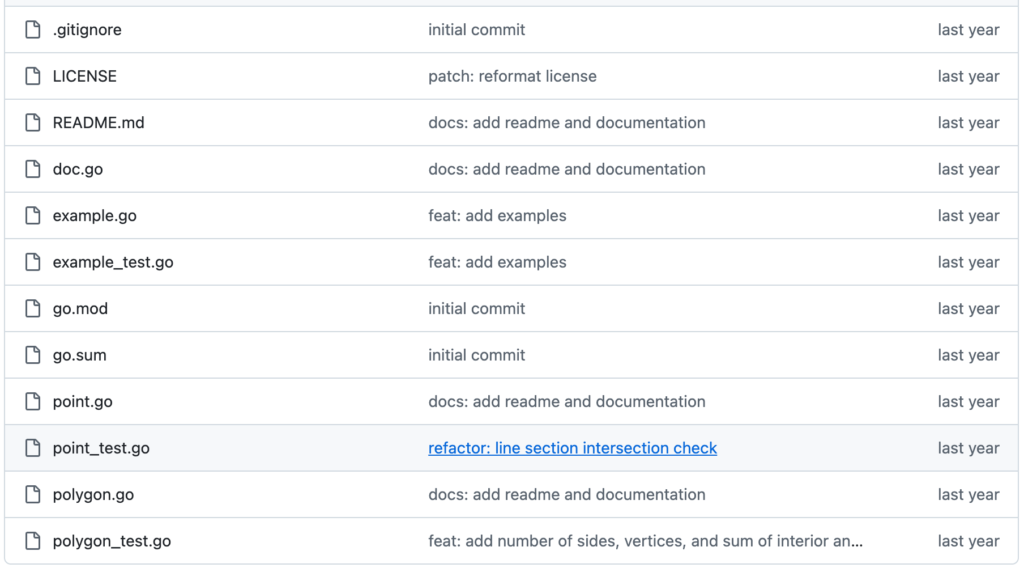
As an example, you can look at my GitHub project. The structure of a library is usually simple. We don’t need subdirectories or even a main.go file. My codebase consists of two files point.go and polygon.go, and also two test files point_test.go and polygon_test.go. The library works by allowing users to construct a polygon (rectangle, triangle, free-form, etc) as a set of connected points (defined by their X and Y coordinates).
Things to note when developing and testing a library:
- All published types must be exported, so start the type definition with a capital letter.
type Point struct {
	X float64
	Y float64
}- Same as types, all published functions must be exported.
func EuclideanDistance(a Point, b Point) float64 {
	return math.Sqrt((a.X-b.X)*(a.X-b.X) + (a.Y-b.Y)*(a.Y-b.Y))
}- Add documentation on top of each published type and function, explaining their uses. It will be uploaded to pkg.go.dev documentation. See Go Doc Comments for details.
// OrientationTriplet returns an integer denoting the orientation made of triplet a->b->c.
//
// There are three possible outputs. If a->b->c is forming a clockwise triangle, it returns 1.
// If a->b->c is forming a counter-clockwise triangle, it returns -1.
// If a->b->c is collinear (forming a line), it returns 0.
func OrientationTriplet(a Point, b Point, c Point) int {
	orient := (b.Y-a.Y)*(c.X-b.X) - (b.X-a.X)*(c.Y-b.Y)

	if math.Abs(orient) < 1e-9 {
		return 0
	}

	if orient > 0 {
		return 1
	}

	return -1
}- It is highly recommended to test every function in a separate test file. Run
go test ./...to see the result, or rungo test -cover ./...to see the test coverage.
import (
	"testing"

	"github.com/hamonangann/polygon"
	"github.com/stretchr/testify/assert"
)

func TestPoint(t *testing.T) {

    // ...

	t.Run("should return 1 if a triplet of points is clockwise", func(t *testing.T) {
		a := polygon.Point{0, 0}
		b := polygon.Point{3, 3}
		c := polygon.Point{3, 0}

		assert.Equal(t, 1, polygon.OrientationTriplet(a, b, c))
	})

	t.Run("should return -1 if a triplet of points is counterclockwise", func(t *testing.T) {
		a := polygon.Point{0, 0}
		b := polygon.Point{3, 3}
		c := polygon.Point{0, 3}

		assert.Equal(t, -1, polygon.OrientationTriplet(a, b, c))
	})

	t.Run("should return 0 if a triplet of points is collinear", func(t *testing.T) {
		a := polygon.Point{1, 3}
		b := polygon.Point{0, 0}
		c := polygon.Point{-1, -3}

		assert.Equal(t, 0, polygon.OrientationTriplet(a, b, c))
	})

    // ...
}- Run
go fmt ./...for formatting each file, andgo mod tidyto remove unnecessary dependencies.
3. Write a License
It is important to protect our library by proper licensing, even if we want to share it as public domain. For this project, I choose MIT License, with several reasons:
- MIT is a permissive license. That means, anybody can use, modify, and redistribute it for any purpose, either commercial or non-commercial. Users of this library can also release their modification under a different license.
- MIT protects me from legal liability caused by bugs in this library. This library comes with no warranty.
If you wish to apply the same license, copy the text for the license to a new file LICENSE (without extension). Both GitHub and pkg.go.dev will detect this.
In go.mod file, you can find that I use testify library for unit testing. It comes with the same MIT license, so I don’t have to worry. However, if your library uses other libraries with any copy restriction, we should not release it.
Additionally, if you don’t include a license, only copyright applies to your library. No user can redistribute your software at all.
4. Add a Documentation Overview
Besides the documentation for each type and function, it is recommended to add the documentation overview, explaining what the library is about. To do that, I created a doc.go file with package <library name>, and put the description on top of the package definition.
This will appear in the document overview section of pkg.go.dev.
// Package polygon is a library for constructing [simple polygons].
// It provides methods to measure polygon properties, such as perimeter, area, and sum of internal angles.
// A simple polygon is a sequence of points that connect to each other without self-intersection.
//
// Euclidean geometry is assumed throughout this library.
//
// Example: (constructing right triangle with 3 points)
//
//	p, _ := polygon.NewPolygon(
//	    polygon.Point{0, 0},
//	    polygon.Point{0, 3},
//	    polygon.Point{4, 0},
//	)
//	fmt.Println(p.Area()) // 6.0
//
// [simple polygon]: https://en.wikipedia.org/wiki/Simple_polygon
package polygon
5. Add a README
This section appears in the front page of our GitHub repository. In my README.md file, I added a guide for installation and contribution, since my library is open source. See my README.md file for example.
6. Push to GitHub
At this step, I am ready to push my code to the online GitHub repository. Please note that the repository name (and GitHub username) must match the module name we have created in step 1.
And that’s it!
7. Release the library version
Once I am sure about the correctness of my library, I release my library as v1.0.0. There are several ways to do that, but GitHub UI is probably the simplest way. See releasing project on GitHub link for the steps.
- When considering a version name, I follow the Go Modules version numbering guide, which is based on semantic versioning.
- It is recommended to add a release description, which explains changes made in a particular release. The description will appear in the release page.

8. Publish and test the library
Now it is time to publish the library. To do this, we need to go to pkg.go.dev and try searching for our package name. If it is not showing, access pkg.go.dev/github.com/<username>/<package-name> and hit the Request button. I did that for pkg.go.dev/github.com/hamonangann/polygon before it was finally published in a few hours.
After it is published, we can test our library using go get github.com/hamonangann/polygon in another project and call any functions.
p, _ := polygon.NewPolygon(
    polygon.Point{0, 0},
    polygon.Point{0, 3},
    polygon.Point{4, 0},
)
fmt.Println(p.Area()) // 6.0
Wrap up
I hope my experience can help fellow developers who want to publish their own Golang libraries! Follow Money Forward LinkedIn page for our company and blog updates.