
by Vaibhav Kulkarni (VeeKay)
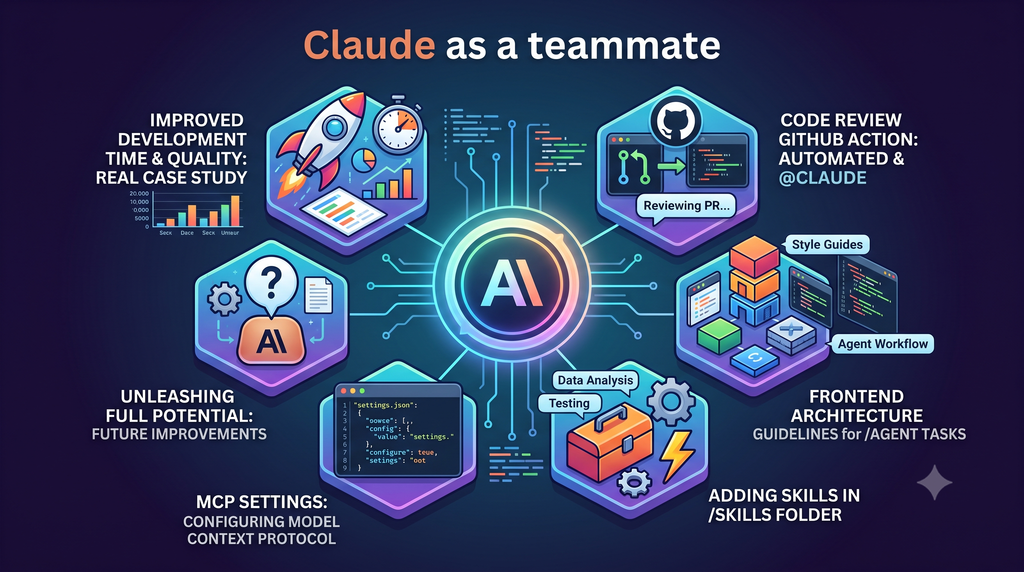
Hi, I’m VeeKay, a Software Engineer at Money Forward India working in AIOps Department. Most “we use AI now” posts stop at “our engineers have a chat window open.” That’s not where real productivity gains come from. Over the last few months, our team has moved Claude from something individuals ask questions of to a part of the repository itself – a reviewer that runs on every pull request, a set of written playbooks it follows, and a config layer that keeps it safe and consistent.
This post is a tour of that setup: what we built, what it’s actually good for, where we’re still falling short.
Our stack, for context: a Python/FastAPI backend, a React + TypeScript frontend, and a fair amount of AWS services (S3, RDS, Lambda, SQS) underneath. None of what follows is specific to that stack, though – the ideas port to any repo.
1. The case study: an AI reviewer on every pull request
The most effective change we made was running an automatic Claude review on every PR before a human looks at it.
The problem it solved is one every team has: review quality is inconsistent. A senior engineer catches the subtle concurrency bug; a busy reviewer approves it without a close look. New joiners don’t yet know the project-specific rules that are easy to get wrong. And the “obvious” pitfalls – the ones each of us has run into once – live in people’s heads, not anywhere a reviewer can look them up.
So we encoded them. When a PR opens, Claude checks out the branch and reviews the diff against a prompt that covers the usual axes (correctness, security, performance, test coverage) plus a checklist of our own hard-won invariants, for example:
- “Timestamps in storage are UTC, but our users are all in one timezone. Any date-range filter built from user input must convert local-day boundaries to UTC first.” This is a real class of bug that’s invisible in code review unless you already know to look for it.
- “All state changes must go through the manager layer – never write to storage directly.” An architectural invariant a newcomer wouldn’t know.
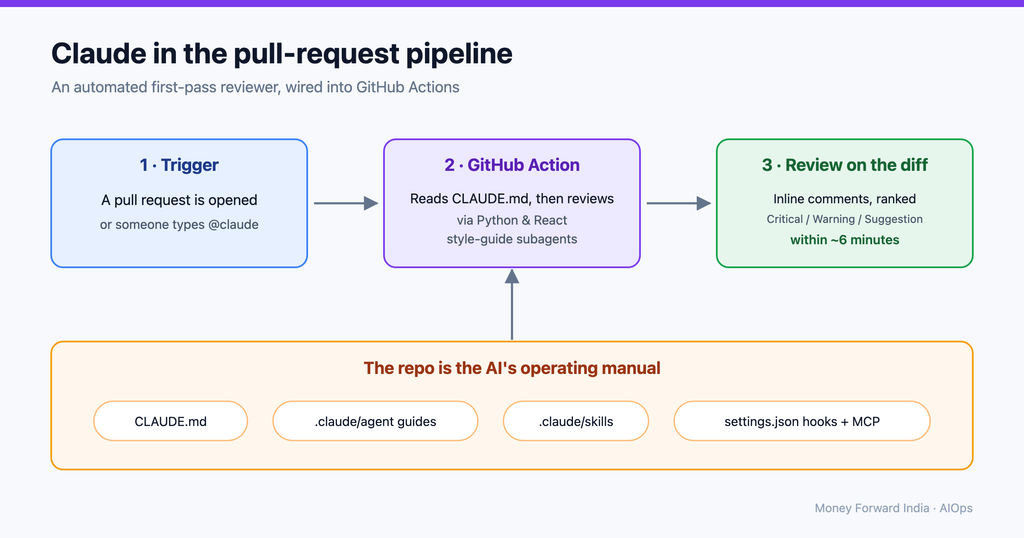
Claude posts findings as inline comments on the exact lines, and categorizes them as Critical, Warning, or Suggestion. We also explicitly ask it to keep reviews short enough to scan in about 15 seconds. It skips drafts and trivial PRs, and it won’t duplicate a comment that’s already there.
What changed for us, qualitatively:
- Whole categories of “you should have known that” now happen before a human reviewer spends attention on them – so humans review the design, not the lint.
- Reviews are consistent regardless of who’s online or how busy they are.
- New team members get the tribal knowledge applied to their code on day one.
And, quantitatively:
Measured directly from GitHub (review volume from our GitHub Actions run history; finding rates and timing from the pull-request comment/review API), scoped to auto-reviews on PRs to our main integration branch that touch application code:
- A dozen PRs reviewed per week over the last eight weeks – essentially every qualifying PR.
- Over those same eight weeks – 96 PRs reviewed – 94% received at least one line-level finding, and 86% received one before a human reviewer looked at the PR. (How many of those findings were worth acting on is exactly what we can’t measure yet – see section 7.)
- A first pass now lands ~6 minutes after a PR opens, where the first review used to be a ~1.9-hour wait for a human.
To be clear: Claude reviews, but a human still approves. We haven’t automated away human sign-off yet – every PR still needs a person to approve the merge. Claude’s pass is exactly that: a first pass. It’s excellent at catching mechanical mistakes and enforcing the invariants we’ve written down, but it doesn’t own the decision. It can raise false positives (and we can’t yet measure how often – see section 7), and the real judgment calls – product intent, architecture trade-offs, whether this is even the right change to make – stay with the human who’s accountable for what ships. The point is that the human starts from a triaged diff and spends their attention on the design and the trade-offs instead of the mechanics.
The meta-point: the reviewer is only as good as what you write down for it. Which is the theme of the rest of this post.
2. How the PR review runs: GitHub Actions + @claude
We use Claude Code’s GitHub Action, wired up in three small workflow files:
a) Automatic, on PR open. A pull_request trigger scoped to the branches and paths we care about (backend and frontend code). No human action needed.
on:
  pull_request:
    types: [opened]
    branches: [main]
    paths: ["backend/**", "frontend/**"]
jobs:
  review:
    uses: ./.github/workflows/claude-review-reusable.yml
    secrets: inherit
b) On demand, via @claude mention. Sometimes you want a re-review after pushing fixes, or a review on a PR the auto-trigger skipped. Anyone with write access can comment @claude on the PR (or on an inline review comment) and the same review kicks off:
on:
  issue_comment: { types: [created] }
  pull_request_review_comment: { types: [created] }
jobs:
  trigger:
    if: >
      contains(github.event.comment.body, '@claude') &&
      (github.event_name == 'pull_request_review_comment' || github.event.issue.pull_request)
    uses: ./.github/workflows/claude-review-reusable.yml
    secrets: inherit
That github.event.issue.pull_request guard matters: issue_comment also fires on plain issues, so without it an @claude on a regular (non-PR) issue would kick off a review job against the wrong number.
c) A reusable core that both of the above call, so the actual review logic – the prompt, the model, the allowed tools – lives in exactly one place.
A few implementation details turned out to matter more than we expected:
- Two modes, one action: Provide a
promptand the action runs automatically (our case). Omit it and the action waits for the@claudetrigger phrase and behaves interactively – it can implement changes and push commits, not just comment. We use the automatic mode for review; the mention path reuses it. - Least privilege on tools: The action is started with an explicit allow-list – it can post PR comments and read the diff, and not much else. Don’t give a CI reviewer write access it doesn’t need.
- Secrets stay secret: The API key is a GitHub secret referenced as
${{ secrets.ANTHROPIC_API_KEY }}; it’s never in the workflow file. (If you’re rolling this out org-wide, the action also supports OIDC workload-identity federation so you store no static key at all) - Guard the cost: Reviews aren’t free – set a job timeout and be aware that a big diff plus multiple sub-reviews burns tokens and Actions minutes.
--max-turnsand path filters are your friends. The biggest lever, though, is what you trigger on: we scope the automatic review to PRs that target our main integration branch (thebranches: [main]filter above), so the many intermediate feature-to-feature PRs don’t each fire a paid review – only the ones that actually gate a merge to main do.
3. Subagents: specialists with their own context
A single reviewer holding every convention in its head does an okay job of all of them; a specialist does one job well. That’s what Claude Code subagents are for: each markdown file in .claude/agents/ defines a subagent with its own system prompt, its own tool access, and – crucially – its own context window, isolated from the main conversation.
We keep three, all review specialists:
python-style-guide– checks Python diffs against our backend conventions.react-style-guide– checks React/TypeScript diffs against our frontend conventions.frontend-testing-guide– checks test files against our Vitest + React Testing Library (RTL) patterns.
During a PR review the main agent dispatches whichever are relevant through the Task tool; each reads only its slice of the diff and reports back. Two things this buys us:
- Focus: A subagent sees only its own conventions and the files it cares about, so the Python reviewer isn’t distracted by a CSS tweak – and the main review context stays clean.
- Reuse: The same specialists that gate a PR in CI are available while you code; Claude can delegate to one mid-task, so you get locally the exact style check your PR will get later.
One thing worth getting right: subagents must live in .claude/agents/ – Claude Code’s reserved folder – or they won’t load. Each needs name/description frontmatter, and the body is the specialist’s system prompt.
4. Skills: turning playbooks into on-demand procedures
Where a subagent is a who, a skill is a how. Skills are step-by-step procedures Claude pulls in only when they’re relevant. Each one in .claude/skills/ is a folder with a SKILL.md entry point (plus any supporting scripts or templates it needs).
Claude reads the detail on demand, and you can also invoke one directly as /skill-name. They’ve become the most valuable part of the setup because they capture the stuff that’s normally locked in one person’s memory. (Anthropic’s guide to building skills is a good primer.)
Ours fall into a few buckets:
- Onboarding / environment: full local setup, running the stack locally, seeding test data.
- Scaffolding: “generate a new API endpoint following our conventions,” “create a new frontend module”
- Testing & quality: our test patterns and commands; a “behavioral guidelines” skill that nudges Claude toward simpler, more surgical changes.
- Domain debugging playbooks: the most valuable kind. Procedures like “how to diagnose this specific class of data-sync failure,” written by whoever solved it the first time. The next person – or Claude – follows the same steps instead of rediscovering them at 2 a.m.
- Ops utilities: regenerating our Entity-Relationship (ER) diagram from the models, deployment/release procedures.
The payoff is that expertise becomes executable. When someone leaves or is on vacation, their hardest-won debugging routine doesn’t leave with them.
The key discipline (straight out of the skills guide): keep each skill’s entry point short and load detail on demand, name them so the model knows when to reach for them, and treat a skill that’s gone stale as a bug.
5. Commands: one-liners for the things you run constantly (.claude/commands/)
Some things don’t need a whole skill – they’re a single, repeatable action you want at your fingertips. That’s .claude/commands/: each markdown file becomes a /<name> slash command, loaded at startup. For example:
/check– runs the same pre-push verification our CI does (type-check, lint, tests) and stops at the first failure, so you catch locally what CI would catch.
Because they live in the repo, every engineer – and Claude – has the same one-liners; the muscle-memory operations stop being tribal knowledge.
One bit of context worth knowing, straight from Claude Code’s directory docs: commands and skills are now the same mechanism. A command is just the lightweight, single-file form; a skill is the same /name invocation but can bundle supporting files. Our rule of thumb: start with a command when it’s one self-contained prompt, and promote it to a skill the moment it needs helper scripts, templates, or staged detail.
Here’s how the whole .claude/ directory is laid out:
📂 project-root
 └── 📁 .claude
      ├── 📁 agents
      │    ├── 📄 python-style-guide.md
      │    ├── 📄 react-style-guide.md
      │    └── 📄 frontend-testing-guide.md
      ├── 📁 commands
      │    └── 📄 check.md
      ├── 📁 context
      │    ├── 📄 fe-architecture-guidelines.md
      │    ├── 📄 gotchas.md
      │    └── 📄 patterns.md
      ├── 📁 skills
      │    ├── 📁 behavioral-guidelines-for-llm
      │    │    └── 📄 SKILL.md
      │    ├── 📁 backend-dev
      │    │     └── 📄 SKILL.md
      │    └── 📁 frontend-dev
      │         └── 📄 SKILL.md
      └── 📄 settings.json
(context/ holds plain reference docs – a frontend-architecture guide, plus patterns and gotchas – that Claude reads for background knowledge when a task calls for it)
6. The config layer: settings.json hooks + MCP (Model Context Protocol)
Two other pieces are important here.
settings.json hooks let us enforce guardrails and automation deterministically, instead of hoping the model behaves:
- A pre-tool hook blocks reads of
.envfiles – Claude can’t pull secrets into context, no matter what a prompt says (with one shell-command gotcha, shown below). - Post-edit hooks auto-run the linter/formatter on any file Claude touches, so it sees and fixes its own violations immediately.
- A hook that fires after each commit (a
PostToolUsematcher ongit commit) reminds it to capture any new gotcha or pattern into our knowledge files – so the repo’s “operating manual” keeps growing instead of rotting.
That .env block has one gotcha worth showing: it only holds if the hook watches shell commands too. The matcher has to include Bash, and the check has to read the command string, not just the file path – otherwise cat .env walks straight past it:
# PreToolUse matcher: "Read|Bash|Grep|Glob"  ← Bash, not just Read
jq -r '[.tool_input.file_path, .tool_input.command] | join(" ")' | grep -q '\.env' && echo '{"decision":"block", "reason":"Reading .env files is blocked - they contain secrets."}'
MCP servers connect Claude to systems beyond the code. For example, instead of asking Claude to guess why a deployment failed, we can give it access to the relevant deployment logs and documentation and let it investigate the failure using the same tools an engineer would use. The rule we follow: credentials are referenced via environment variables, never hardcoded in the MCP config.
Together these turn Claude from “a smart text box” into “a teammate that operates inside our actual toolchain, with guardrails in place.”
7. Where we’re not using Claude to its full potential
An honest section, because the interesting question isn’t what we’ve done – it’s what we haven’t.
- Lack of Quality Evaluation: We don’t have an eval loop measuring precision and recall. We know Claude leaves comments, but we aren’t systematically tracking how often those findings are actionable versus noise. Tuning system prompts without a baseline eval set of past PRs is mostly guesswork.
- Unused Automation Paths: We rely almost exclusively on passive PR reviews. The underlying GitHub Action can create PRs from issues, resolve comments autonomously, or run on a night cron (e.g., triaging flaky tests or summarizing merge risks), but we haven’t wired up these proactive workflows yet.
- Cost and Latency Optimization: We haven’t benchmarked parameters like
--max-turns, dynamic model routing per diff size, or concurrency limits. Some routine checks could be significantly cheaper and faster without dropping review quality.
If we address only one thing next, it will be the eval loop — because prompt tweaks and cost optimizations are blind efforts until we can measure precision.
Bonus: let Claude tap you on the shoulder
One small quality-of-life win that’s easy to overlook: Claude can notify you when it finishes or needs your input. A notification hook in settings.json turns a long-running task – a big refactor, a full test run, a multi-step plan – into something you no longer babysit. Kick it off, switch to something else, and you get a desktop ping the moment it’s done or blocked on a question. Small thing; surprisingly large effect on how it feels to work alongside Claude rather than waiting on it.

Takeaways
If you want to get past “we have a chat window”:
- Put the AI in the pipeline, not just the IDE. A reviewer on every PR is the fastest win.
- Write your knowledge down where the model can read it – architecture guides, style guides, and skills beat re-explaining yourself in every prompt.
- Use config for guardrails, not good intentions – block secret access, auto-lint, and least-privilege the tools.
- Measure it. The teams that get compounding returns are the ones with a feedback loop, not just a bigger prompt.
Our main takeaway: treat your repository as the AI’s operating manual. Every hour spent writing it down comes back every time the model runs.